

Embracing Ergonomics for a Healthier and More Productive Workplace
In a world where productivity often takes precedence over well-being, the concept of ergonomics emerges not just as a solution—but as a necessity. According to The Hellenic Institute for Health and Safety at Work (ELINYAE), the core objectives of ergonomics are clear: to safeguard worker health, reduce both physical and mental strain, enhance enjoyment in daily tasks, and optimize overall efficiency. Yet, in many contemporary workplaces, these goals are still treated as afterthoughts rather than foundations.
Too often, employees push through fatigue, ignore discomfort, and adapt to poorly designed workspaces—sometimes without even realizing the long-term consequences. Ηοςεωερ, investing in ergonomic office design isn’t simply about providing a better chair or a sit-stand desk. It’s about cultivating a culture that recognizes the direct link between physical well-being and organizational success. When employees are supported—literally and figuratively—they perform better, think more clearly, and stay engaged longer.
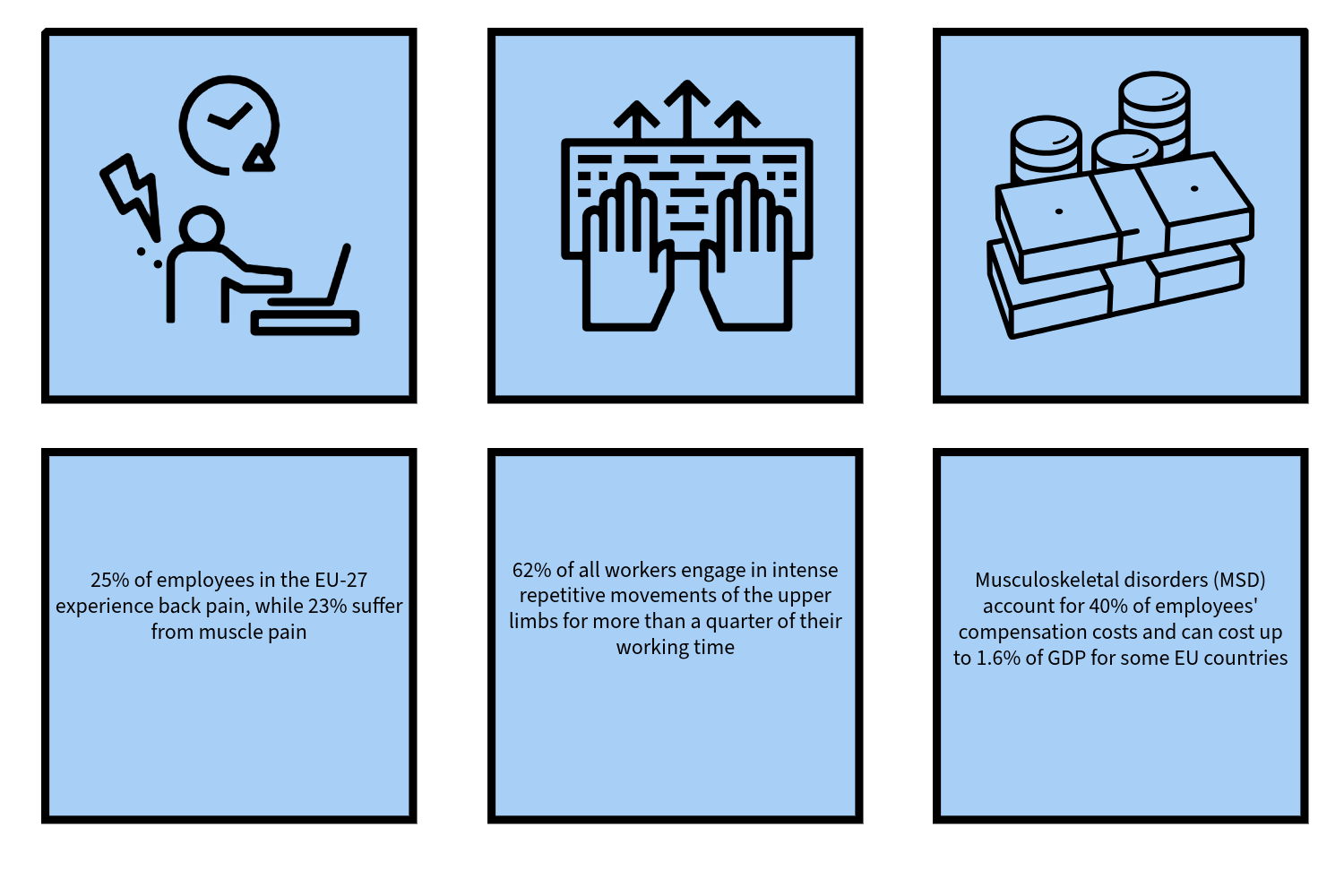
Key problems and costs due to the lack of ergonomic solutions in the workplace according to ELINYAE
A critical aspect of ergonomics is being attuned to one’s body and recognizing signs of overexertion. In high-pressure environments, it is all too easy to ignore the signals your body sends, leading to prolonged work without breaks or proper posture, ultimately resulting in physical strain. Establishing strong work habits is vital for maintaining optimal physical well-being. Investing in ergonomic design is not just a perk; it’s a strategic decision for any company. The physical well-being of employees, closely linked to effective workplace ergonomics, has a direct impact on productivity and the overall relationship between employees and the company.
Office Ergonomic Tips
The Key to an Ergonomic Chair: Unlocking Maximum Support for Your Body
Office chairs are a pivotal element in the ergonomic landscape of any office. A quality office chair must provide sufficient back support and allow for adjustments to both the backrest and seat. Many of today’s ergonomic chairs feature a weight-activated mechanism that automatically adjusts the resistance on your back, according to your weight. This ensures optimal support and comfort without constant adjustments, empowering employees to focus on their tasks efficiently.
To truly enhance your comfort and productivity, it’s essential to adjust your desk chair for optimal support:
- Knee Positioning: Ensure your knees form a 90° angle while keeping your feet firmly planted on the floor. This simple adjustment is crucial for proper circulation and support.
- Back Support: Your back should rest fully against the chair for the best support. This alignment helps maintain your spinal posture and reduces fatigue.
- Elbow Alignment: Your elbows should rest comfortably against the armrests, keeping them at a right angle. This prevents strain on your shoulders and neck.
Regardless of your chair type, it’s vital to change your sitting position frequently and take short breaks. This practice not only alleviates muscle tension but also significantly enhances the overall ergonomics of your workspace.
Download our ergonomic task chair brochure
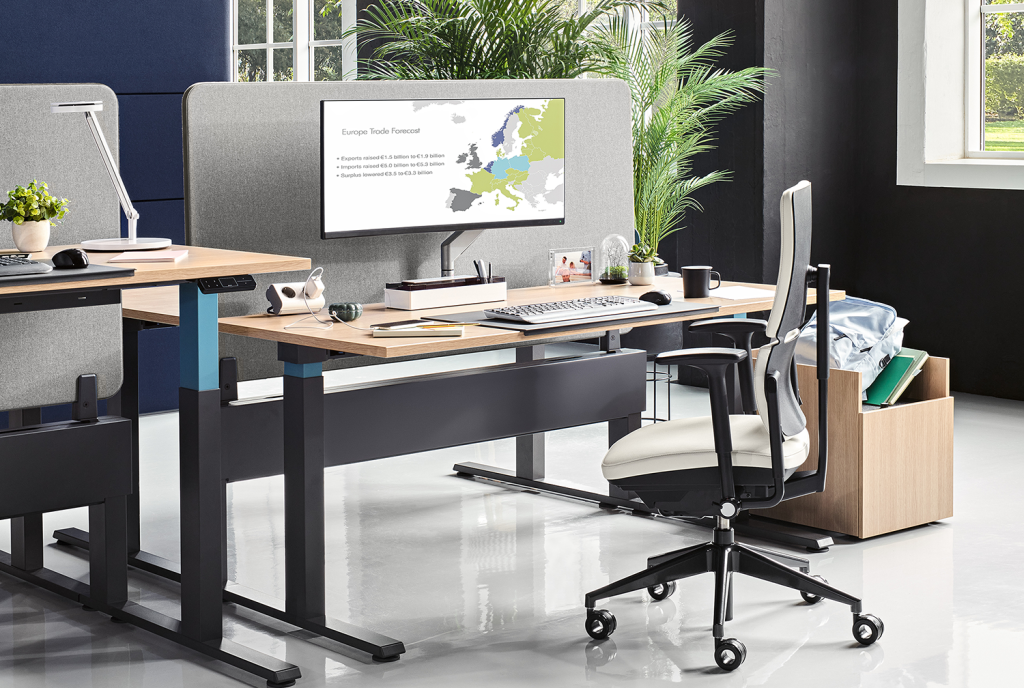
Harness the Power of Ergonomic Height-Adjustable Desks
Investing in a height-adjustable desk can revolutionize your work routine by reducing your sedentary time. However, it’s important to remember that standing for prolonged periods can also cause discomfort. Experts in ergonomics recommend a balanced approach—alternating between sitting, standing, and walking throughout your day.
For effective time management, consider routines such as 20 minutes of sitting followed by 8 minutes of standing and 2 minutes of walking, or alternating 15 minutes of sitting with 15 minutes of standing. This dynamic approach fosters a more active work style, enhancing both your energy levels and focus. Start by gradually increasing your standing time—begin with just a few minutes per hour and build up as your body acclimates. This mindful practice will optimize your well-being and productivity, making your work environment truly ergonomic and supportive.

Optimize Your Workspace for Comfort and Efficiency with a Monitor Arm
A monitor arm is probably the most important office accessory when it comes to ergonomics. And yet, it’s the one that is most often missing from desk or not used properly.
Tips for using your monitor arm efficiently:
- Ideal Screen Distance and Height: Position your computer screen at arm’s length to significantly reduce eye strain. The top of your screen should align with your eye level, while the angle between the top and the center of the screen should be around 15°.
Tip: If you have a height-adjustable desk, adjust your screen’s position, when you change to a standing position, to ensure it’s not too far away or too low. This small adjustment can lead to substantial improvements in your comfort and focus. - Maximize Dual Screen Use: If you use two screens, consider how you interact with each. If one screen serves as your primary display, it should be directly in front of you, while the secondary screen can be positioned to your right or left. If both screens are equally important, arrange them side by side centered across from you. This setup fosters efficiency and enhances your workflow.
- Elevate Your Laptop Experience: For laptop users, investing in a sturdy laptop stand is essential to elevate your screen to eye level. Combine this with an external mouse and keyboard to create a more ergonomic setup. This adjustment will not only promote better posture but also enhance your productivity.
A lot of monitors allow for height-adjustability nowadays. But the built-in function is not sufficient for your height, then it is best to use a monitor arm.
Illuminate Your Workspace Effectively
Proper lighting is vital for minimizing eye strain and boosting overall morale. If your workspace lacks natural light, consider adding a high-quality desk lamp to brighten your area. A well-lit environment can significantly improve your focus and create a more inviting atmosphere.
The Value of Ergonomics
Creating ergonomic workplaces is not just a luxury—it’s a necessity, especially in large organizations with diverse employee needs. While tailoring these solutions can be challenging, the benefits are undeniable. Investing in ergonomic designs fosters employee well-being, boosts productivity, and ultimately enhances organizational success. Prioritize comfort and efficiency; it’s an investment that pays dividends for both your employees and your business.